UKey Wallet and Core 26: A Web3 self-custody stack

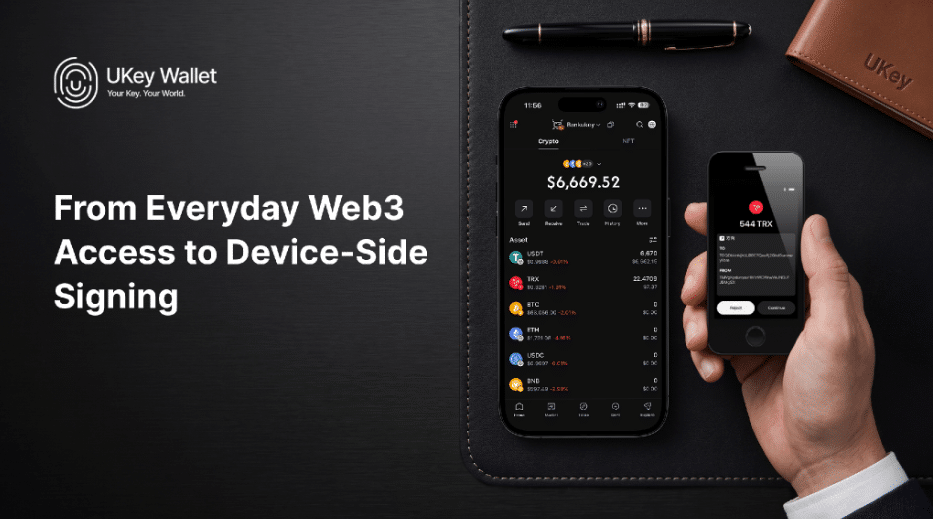
UKey is positioning UKey Wallet and UKey Core 26 as two parts of the same self-custody workflow. UKey Wallet is the company’s multi-platform wallet application for supported account management, asset transfers, and Web3 access. UKey Core 26 is a touchscreen hardware wallet that can take over the final signing step. Used together, the app prepares a transaction while Core 26 displays the request and signs it on the device.
That gives users a straightforward choice. UKey Wallet can be used on its own for regular activity. Users who want a separate device for private-key operations and transaction approval can pair it with Core 26.
From Web3 access to hardware signing
In software-only mode, UKey Wallet lets users create accounts, send and receive supported assets, and interact with supported Web3 applications without hardware. Private keys are managed locally on the user’s phone rather than by UKey servers, so the user remains responsible for device security and the recovery phrase.
That setup may suit frequent transactions, exploratory use, or a limited day-to-day balance. It also calls for basic discipline: download the app from official sources, keep the phone and app updated, protect the device lock, and store the recovery phrase offline, not in screenshots, cloud storage, email or chat.
When paired with a UKey hardware wallet, the app becomes the operational interface. It can show accounts, prepare transactions and connect to Web3 services, while the hardware device handles private-key signing. UKey states that its servers do not hold users’ private keys or recovery phrases.
Core 26: The hardware signing layer
UKey Core 26 is a hardware wallet with a 3.5-inch color touchscreen. Its published specifications describe a four-chip security architecture and list an EAL6+ secure-chip level. Depending on the client and workflow, it supports Bluetooth, USB and QR-based connections.
For users, the practical point is simple: key handling and approval can take place on a dedicated device instead of relying entirely on the connected phone or computer.
A phone or computer can assemble a transaction request, but Core 26 presents the details for review before signing. Once approved, the signed transaction is returned to the software client and broadcast to the relevant blockchain network.
That does not remove the need for judgment. Users should still check the recipient address, amount, network and authorization details on the device screen. A hardware wallet can strengthen the boundary around private-key operations, but it cannot protect a recovery phrase that has already been exposed or undo an approval given to a malicious request.
One stack, different roles for your assets
UKey presents the app and device as complementary tools, not competing products. Some users may keep a limited day-to-day balance in a software wallet while reserving Core 26 for longer-term holdings or transactions where an additional confirmation step is preferred.
|
Use case |
UKey Wallet on its own |
UKey Wallet paired with Core 26 |
|---|---|---|
| Primary role | Mobile-first access to supported assets and Web3 services | Software interface plus device-side signing |
| Key and signing model | Software-wallet workflow on the local phone | Private-key operations and signing performed on Core 26 |
| Typical consideration | Convenience for regular activity | Added separation for accounts needing stronger transaction isolation |
| What the user must protect | Phone security and recovery phrase | Hardware device, recovery phrase and transaction-review process |
The app handles connectivity and account access. The device provides a separate point for reviewing and approving a transaction.
Self-custody still starts with recovery hygiene
A hardware wallet does not make an exposed recovery phrase safe again. If a phrase was created or entered on an internet-connected device, importing that same phrase into a hardware wallet does not remove the earlier exposure.
Users who want a separate hardware-protected account should create and back up a new recovery phrase on the device, then carefully verify destination addresses before transferring assets.
Recovery phrases should never be shared with support personnel, entered on unverified websites, or sent through email or messaging services. Anyone who obtains the phrase may be able to control the associated assets.
Explore UKey Wallet and Core 26
UKey Wallet is available through the company’s official download page, which links to supported desktop and mobile versions. UKey advises users to verify the platform, publisher and version before installation or upgrade.
Current Core 26 specifications, supported workflows and availability are available on the UKey Core 26 product page. Purchasing options, delivery, taxes, warranty and after-sales support may vary by region. Readers should consult UKey’s official channels for information applicable to their location.
For current product details, supported-asset information or setup guidance, visit ukey.com for the latest updates.
About UKey
UKey is the crypto-asset hardware wallet and seed phrase backup product line associated with UKey Wallet. UKey Wallet and UKey are trademarks held by UKEY LIMITED.
Disclaimer: This is a paid post and should not be treated as news/advice.